Data source user defines how the access token and other user information received from the user during the authentication flow (like username or ID) is stored.
If you have configured authentication in your connector, you should also configure the data source user object to store the access token and other user-related information, so you can use these values later in your connector through placeholders.
The data source user is configured by adding the dataSourceUser object in the connector configuration.
You can also configure a request under data source user object to fetch additional information about the user. For example, if the API provides a /me endpoint to fetch details of an authenticated user, configuring a request to that endpoint under data source user object is a good practice.
Note
If your connector does not have authentication configured, you don’t need to include a data source user component in your configuration.
Example configuration
The data source user component has two main objects under it:
userInfo: Object allowing you to configure what information and properties are stored for the user. Common examples of such information are:User ID (
userId)Display name (
label)Access token (
accessToken)
request: Object allowing you to configure an additional request to be made for fetching user information programmatically via API
Configuring userInfo object
This object defines which information we store from the user and where the values come from. In general, these values can come from two sources:
User inputs during authentication (source:
userInput)From the request configured under data source user (source:
jsonPath)
Value from inputs
Here is an example configuration where values come from inputs during the authentication flow, commonly used with API key authentication:
idis generated programmatically using{{identity()}}placeholderlabel, also known as display name, coming from a field with IDaccount_nameconfigured in the authenticationaccessToken, coming from the field with IDapi_keyconfigured in the authentication
  "dataSourceUser": {
    "userInfo": {
      "id": {
        "source": "static",
        "value": "{{identity()}}"
      },
      "label": {
        "source": "userInput",
        "value": "account_name"
      },
      "accessToken": {
        "source": "userInput",
        "value": "api_key"
      }
    }
  }
Value from JSON-formatted request
Here is another example configuration where values come from a JSON-formatted request, for which you can find the configuration below:
idis read from the response fieldidlabel, also known as display name, coming from the response fielddisplay_nameNote: In this case, we haven’t configured
accessToken, as in this case, we’ve assumed it’s already stored as part of the OAuth2 authentication flow
  "dataSourceUser": {
    "userInfo": {
      "id": {
        "source": "jsonPath",
        "value": "$.id"
      },
      "label": {
        "source": "jsonPath",
        "value": "$.display_name"
      }
    }
  }
Configuring request object
Now, let’s look at an example for a case where we want to configure a request to fetch user information. We will use the Spotify API again as an example.
The Spotify API has an endpoint https://api.spotify.com/v1/me that can be used to get information about an authenticated user. It will return information like the display name and email of the user.
Thus, we will configure request object under the dataSourceUser object, so data is fetched automatically when the user authenticates. We’ll configure:
GET request to the correct endpoint
Request headers, including the access token used via a placeholder
Response handling that defines how the response should be read
A configuration would look like this:
"dataSourceUser": {
    "request": {
      "method": "GET",
      "url": "https://api.spotify.com/v1/me",
      "headers": [
        {
          "name": "Authorization",
          "value": "Bearer {{user.access_token}}"
        }
      ],
      "response": {
        "type": "JSON",
        "dataRows": {
          "source": "jsonPath",
          "value": "$"
        }
      }
    }
}
And now, when we combine it with the userInfo object, we have a full configuration for the Data source user:
"dataSourceUser": {
    "request": {
      "method": "GET",
      "url": "https://api.spotify.com/v1/me",
      "headers": [
        {
          "name": "Authorization",
          "value": "Bearer {{user.access_token}}"
        }
      ],
      "response": {
        "type": "JSON",
        "dataRows": {
          "source": "jsonPath",
          "value": "$"
        }
      }
    },
    "userInfo": {
      "id": {
        "source": "jsonPath",
        "value": "$.id"
      },
      "label": {
        "source": "jsonPath",
        "value": "$.display_name"
      }
    }
  }
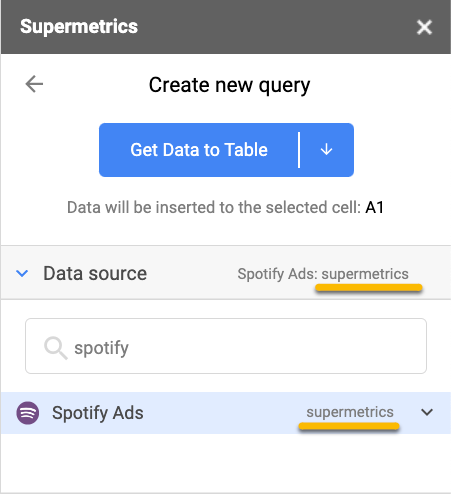
How data source user is shown in Supermetrics products
The information stored under data source user lives as a connection in the Supermetrics product. The label property in the data source user defines the value show to the user and can be used to identify different connections to the data source.