API key authentication flow is the method used to authenticate to APIs that provide an API key or an access token, which must be included in each request.
The most common way to configure API key authentication is with type: "user_input", where each user provides their own API key when connecting. If instead the same, fixed API key should be used for all users without asking them for input, you can store it as a secret and reference it directly in requests – see Using a fixed API key without user input at the end of this page.
In the user_input authentication type, you must define one or multiple input fields to be shown when connecting to the data source. Because the API key is a sensitive value, you should register it as a secret so it's encrypted and kept out of the plain-text configuration — even though each user provides their own key. This is shown in the sections below.
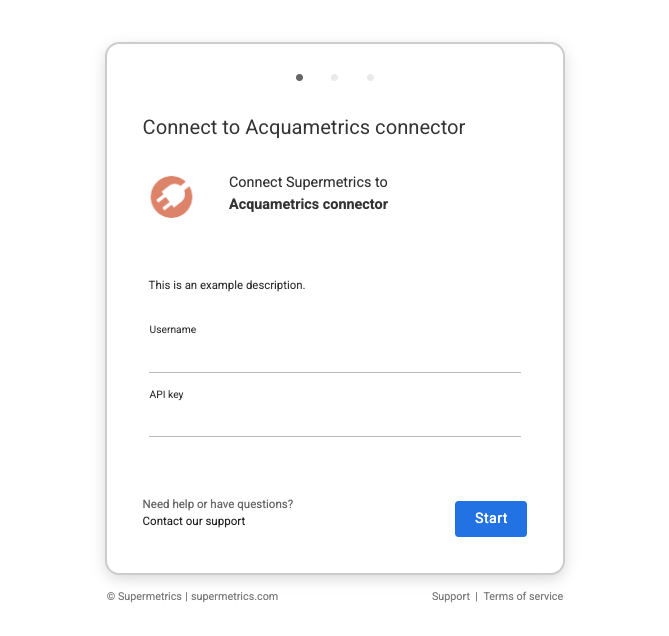
Configuring API key authentication
API key authentication is configured with type user_input in the connector configuration. User input authentication allows you to request the user to input necessary credentials during the authentication flow, which you can later use in API requests through placeholders.
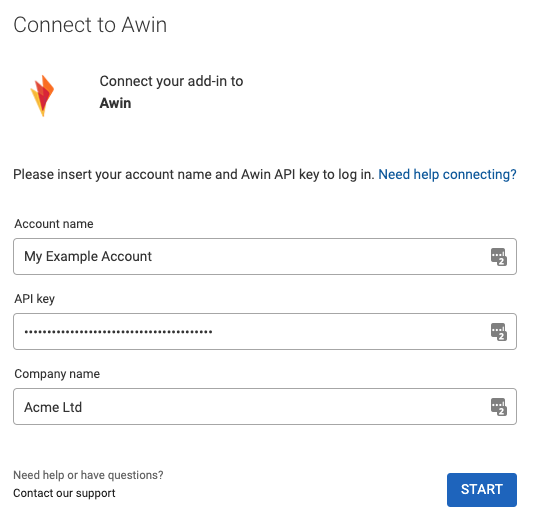
Below, you can find an example where we are defining three input fields for the authentication flow:
- Account name (ID:
account_name) - API key (ID:
api_key) - Company name (ID:
company_input)
Account name and Company name are defined as text fields, and the API key is defined as a password. As the API key is a password, the typed value is hidden. The configuration for the authentication would look like this:
{
  ...
  "authentication": {
    "type": "user_input",
    "description": "This is a description for API key authentication"
    "userInputs": [
      {
        "id": "account_name",
        "label": "Account name",
        "type": "text"
      },
      {
        "id": "api_key",
        "label": "API key",
        "type": "password"
      },
      {
        "id": "company_input",
        "label": "Company name",
        "type": "text"
      }
    ]
  }
  ...
}
In this case, the Supermetrics data source connection flow would look like this:
Registering the API key as a secret
The API key is a sensitive value, so rather than storing it in plain text you should register it as a secret. Even though each user provides their own key through user input, registering it as a secret keeps the value encrypted and out of the plain-text configuration.
Add a secrets object at the connector root and register the API key with source: "userInput", setting value to the id of the API key input field (api_key):
"secrets": {
  "items": [
    {
      "id": "api_key",
      "classification": "secret",
      "source": "userInput",
      "value": "api_key"
    }
  ]
}
The secret classification marks the value as sensitive, and source: "userInput" tells the connector to collect it from the user during authentication. At request time, you reference it with the {{secrets.api_key}} placeholder – see Using the inputted values in requests below.
Storing other inputted values in Data source user
The remaining, non-sensitive values inputted by the user should be stored using the Data source user component, so you can use them later in the configuration. The API key is not stored here – it's handled through the secrets object above.
In this example configuration:
- The Account name inputted by the user is stored as
labelso users can identify different authentications from each other. - A Data Source User ID is generated using the
{{identity()}}placeholder to generate a unique ID for each authentication. - The company name is stored under additional properties with the ID
company.
An example of the full authentication, secrets, and data source user configuration for the above would look like this:
"authentication": {
  "type": "user_input",
  "description": "This is a configured login description",
  "userInputs": [
    {
      "id": "account_name",
      "label": "Account name",
      "type": "text"
    },
    {
      "id": "api_key",
      "label": "API key",
      "type": "password"
    },
    {
      "id": "company_input",
      "label": "Company name",
      "type": "text"
    }
  ]
},
"secrets": {
  "items": [
    {
      "id": "api_key",
      "classification": "secret",
      "source": "userInput",
      "value": "api_key"
    }
  ]
},
"dataSourceUser": {
  "userInfo": {
    "id": {
      "source": "static",
      "value": "{{ identity() }}"
    },
    "label": {
      "source": "userInput",
      "value": "account_name"
    },
    "properties": [
      {
        "id": "company",
        "source": "userInput",
        "value": "company_input"
      }
    ]
  }
}
Using user-inputted values in requests
To use the values the user has inputted during the authentication, and which we stored under data source user or registered as a secret, we should use placeholders. These placeholders can be used under request object in any part of the configuration. Within request object, you can define the placeholder to be used in:
- Request URLs
- Request headers or parameters
With the above configuration, you would have the following placeholders available to use:
{{secrets.api_key}}to use the API key inputted by the user, resolved from the registered secret{{user.properties.company}}to use the Company name inputted by the user
An example usage of company name in the request URL and the API key in the request headers could look like this:
"request": {
  "method": "GET",
  "url": "https://{{user.properties.company}}.exampleAPI.com/products",
  "headers": [
    {
      "name": "api_key",
      "value": "{{secrets.api_key}}"
    }
  ],
  "response": {
    "type": "JSON",
    "dataRows": {
      "source": "jsonPath",
      "value": "$.products.*"
    }
  }
}
Using a fixed API key without user input
In some cases, you might not need to connect to a connector with multiple credentials, or the data source is always accessed with a single, fixed API key. In these cases, there's no need to ask the user for the key through input, and you don't need an authentication component or a Data source user object at all.
Instead, you can store the API key as a secret and reference it directly in your requests. This is the preferred approach when no user input is required.
Storing the API key as a secret
In the Connector builder, open the secret encryption tool and create a new secret. Enter a name for it – this becomes the secret's id – and paste your API key as the value. When you save, the key is stored securely in the Connector Builder vault, and the corresponding entry is added to the secrets object in your configuration automatically.
The generated entry has a classification of secret and resolves its value through the connector_builder_vault component:
"secrets": {
  "items": [
    {
      "id": "api_key",
      "classification": "secret",
      "component": {
        "override": {
          "componentId": "connector_builder_vault"
        }
      },
      "value": "api_key"
    }
  ]
}
Note
You don't need to author this entry by hand – the Connector builder creates and updates it for you when you save the secret in the UI. See Secrets for more details and other ways to define secrets.
Using the API key in requests
Reference the secret with the {{secrets.<id>}} placeholder, where <id> matches the secret's id. You can use it anywhere secret placeholders are permitted, such as request URLs, headers, and parameters. See Secrets for more details.