With the Supermetrics Insights agent, you can talk with an AI agent about your marketing data in plain language.
Ask questions, get instant answers, dive deep into analysis, and build powerful Dashboards with AI-generated charts and insights in minutes.
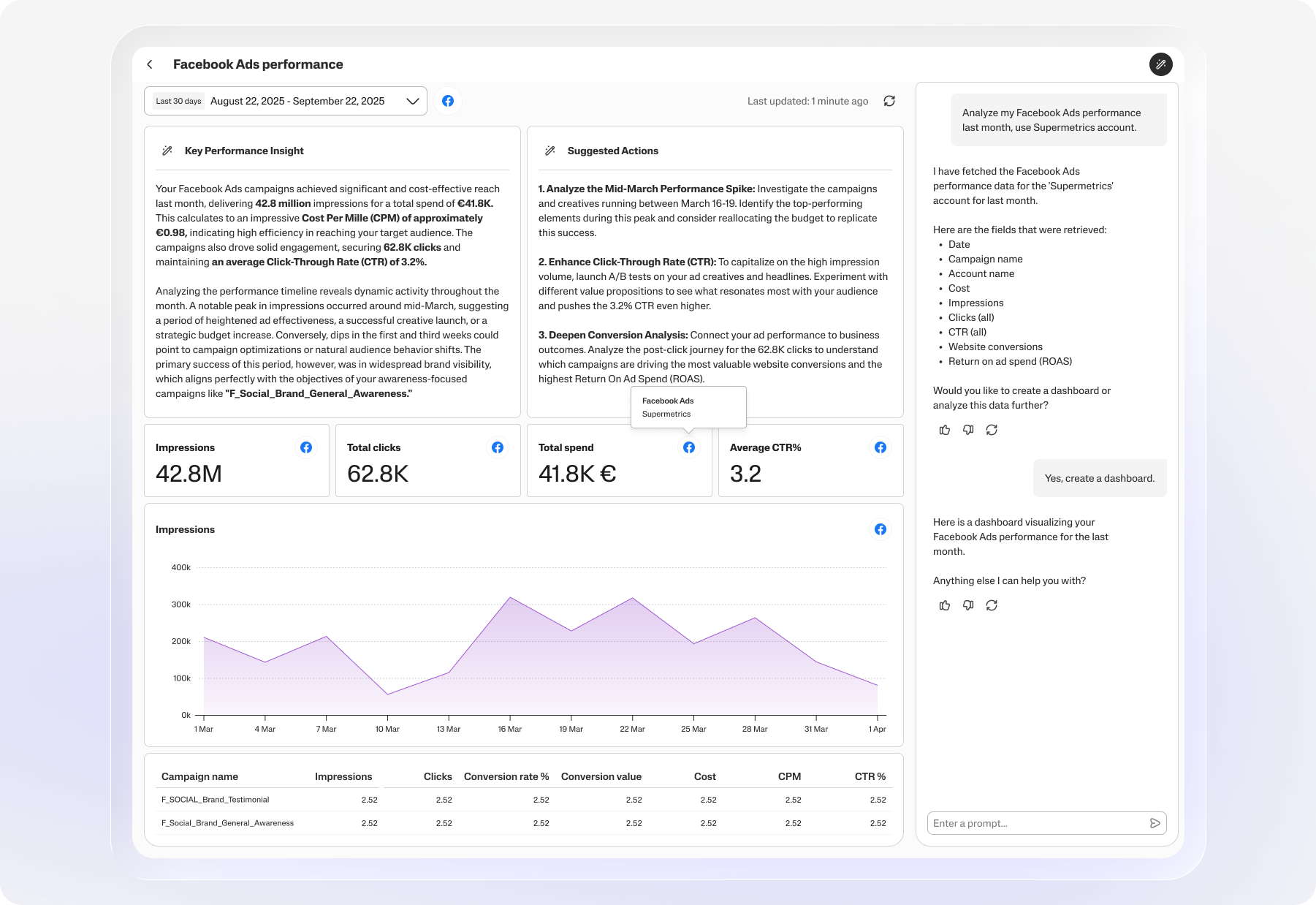
Example prompts for the Insights agent:
Analyze my Facebook Ads performance from last month, compared to the previous one
Show me trends in my Google Ads click-through rates
Compare the cost per website lead across my Facebook Ads campaigns
What are the best-performing pages on my website, based on Google Analytics 4 data?
How did my Google Ads spending change over the last quarter?
Insights boards and chat sessions are private and accessible only to you. In the future, we plan to add ways for you to share the boards within your team and externally.
Note on availability
The Insights agent is currently a Beta product and we’re working on adding more features. It’s available for all users with an active paid or trial subsciption for the Supermetrics Hub.
Instructions
On the Supermetrics Hub, go to Insights agent under Analyze.
Click Open Insights agent.
Give a prompt to the AI agent using natural language.
You can ask anything as long as it’s about your data in Supermetrics.
The agent will ask follow-up questions if needed.
You can ask the agent to create dashboards and visualize the data.
The chat session and dashboard are automatically saved, and you can access them later in the Boards listing:
To continue a past discussion with the Insights agent, click the name of the board and type your question.
To start a new discussion with the Insights agent, click New insights board.
Available features
With the Insights agent, you can:
Ask the agent any questions about your data
Depending on the question, the agent will ask follow-up questions or answer with textual analysis or with a dashboard
Use pre-built recipes to get detailed data insights
Include interactive widgets in the analysis responses.
Prompt the agent to add, change, or remove dashboard components/widgets
Use natural language – the agent understands almost anything
Revisit your old discussions
Dashboards are saved automatically in the Boards listing so that you can come back to them later
The Insights agent currently knows how to:
Work with the following data sources:
Facebook Ads
Google Ads
Google Analytics 4
TikTok Ads
LinkedIn Ads
Run statistical analysis, such as:
Comparing performance period-over-period
Comparing 2 campaigns or creatives against each other
Frequency monitoring
Outlier detection
Create a dashboard using one data source at a time
Use the following widget types:
KPI scorecards
Tables
Line charts
Bar charts
Recipes
The Insights agent comes with pre-built analysis recipes organized by platform and use case. These recipes are a curated library of the most valuable questions you can ask your marketing data. With one click, you can send a rich, well-crafted prompt to the Insights agent and immediately get actionable insights. To view all available recipes, click More recipes.
Just select a recipe for a use case you’d like to explore, then select the accounts to use, and that’s it!
Inline widgets
The Insights Agent creates interactive charts and tables directly inside its analysis.
When the Insights agent runs an analysis, it autonomously decides whether a visual would be more useful than plain text, selects the appropriate widget, and places it at the most meaningful point in the response. You can also explicitly ask for the Insights agent to create a widget at any time.
Supported widget types:
Table: Inspect structured data at a glance
Bar chart: Compare performance across campaigns, ad types, or time periods
Time series: Track trends over time
Features coming soon
We’re training the Insights agent to handle more things over time. Our team is focusing on adding the following features next:
More supported data sources
More advanced analytics use cases, deeper insights
Dashboards joining data from multiple data sources
Sharing dashboards and chats with your team or externally
Automated reports
We want your feedback
Insights agent is an evolving feature, and your feedback helps shape its future.
Please explore the feature and let us know how we can improve your experience! Your input helps us build the right tools for your team.
You can give feedback directly on the agent messages by clicking the thumbs up/down buttons. Alternatively, for overall feedback, click Share feedback in the top-right corner.